
Guide to Switching Characters in Suicide Squad: Kill the Justice League
In Suicide Squad: Kill the Justice League, character switching is a fundamental aspect of gameplay that enhances your experience, whether you’re playing solo or with friends in online multiplayer. Here’s a detailed guide on how to effectively switch between squad members:
Solo Play
1. Switching Characters: In solo mode, to switch between members of the squad, you need to be out of active combat. Once you’re in a safe area, press the Left D-Pad button on your console or the corresponding key on PC. This action will bring up the Squad Wheel for character selection.
2. Understanding Character Symbols: Each of the four core characters has their own unique symbol on the Squad Wheel:
– Captain Boomerang: Represented by a boomerang symbol.
– King Shark: Indicated by a shark fin symbol.
– Harley Quinn: Depicted with four diamonds.
– Deadshot: Shown with a target symbol.
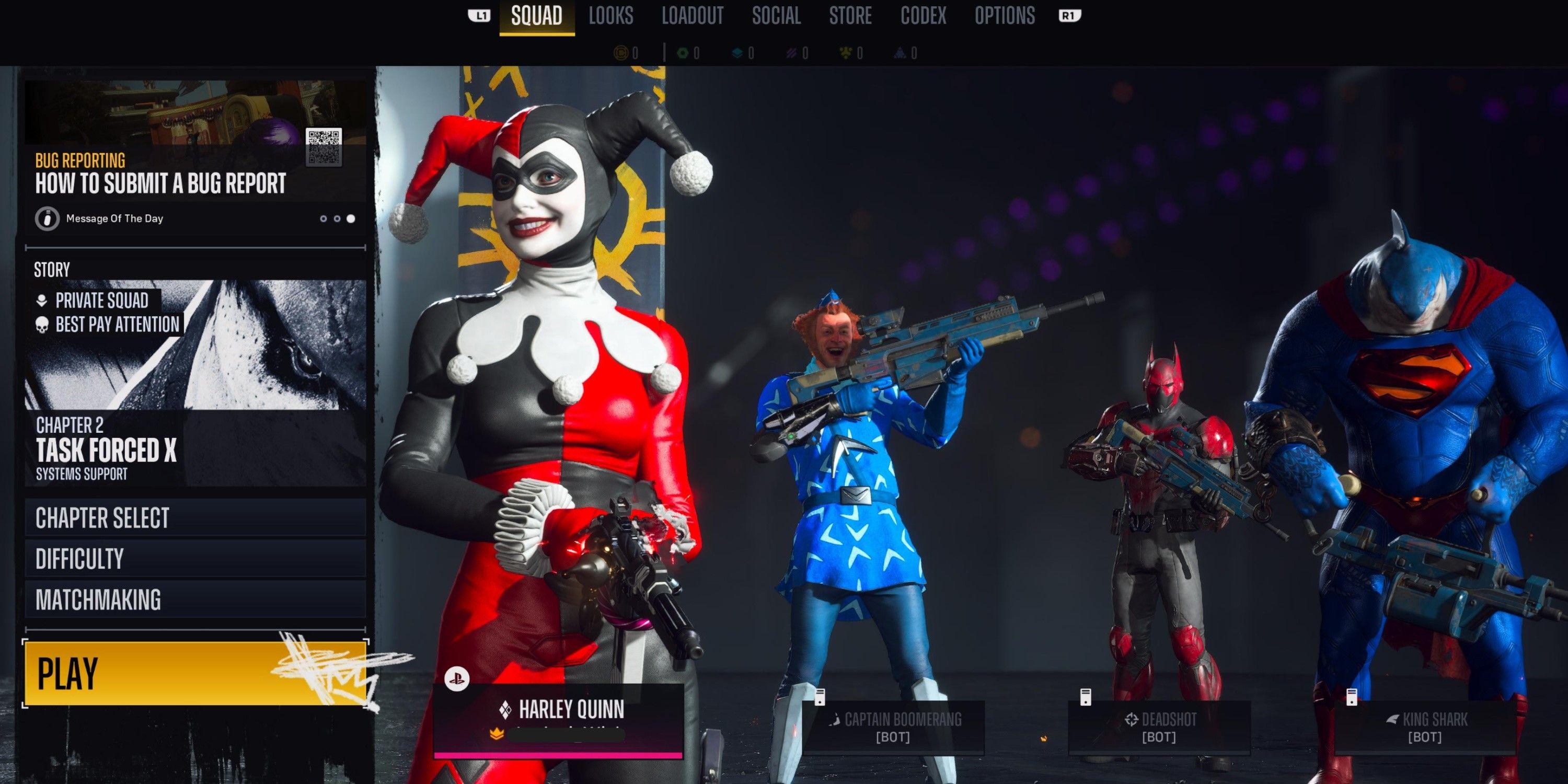
3. Using Rick Flag for Character Selection: Alternatively, you can access the Squad Menu by visiting Rick Flag at the Hall of Justice. Approach him and press the Triangle button on PlayStation or the Y button on Xbox to change your character and strategize your squad setup.
Online Multiplayer
1. Assembling Your Squad: Prior to entering online multiplayer, it’s essential to select your characters from the Squad Menu. Make sure that your main character is positioned on the left side of the screen, and if you have chosen a secondary bot character, it will be on the right side.
2. Character Switching in Matches: While in an active online match, character switching is limited to the selections you made before entering. It’s crucial for each player to choose different characters to avoid duplicates within a squad, ensuring a diverse set of abilities and strategies in gameplay.
3. Adjusting Your Squad with Rick Flag: Similar to solo play, players can visit Rick Flag at the Hall of Justice during cooperative play to modify their squad composition and switch characters, if necessary.
Additional Tips
– Combat Restrictions: Remember that switching characters is not permitted during active combat; you can only change characters when you are safe and not engaged in fights.
– Unique Characters Online: Each online player must select a different member of the squad. This restriction ensures a balanced team composition and utilizes the different strengths of each character effectively.
– Playable Character Expansions: Look out for future updates, as new characters like The Joker or Mr. Freeze may be added to the roster. Once they are unlocked, they will be available in the Squad Menu for selection.
By following this guide, you will be able to navigate character switching seamlessly in Suicide Squad: Kill the Justice League, enhancing both your solo and multiplayer gameplay experience. Enjoy your missions and the dynamics each character brings to the table!



Leave a Reply