
Based on the information provided about adjusting weather settings in Microsoft Flight Simulator 2024, here’s a comprehensive guide that not only walks through the steps for weather adjustments but also situates it in the broader context of potential updates for future versions, such as a hypothetical “Flight Simulator 2025.”
—
Weather Adjustment Methods in Microsoft Flight Simulator 2024
Pre-Flight Configuration
1. Main Menu Setup
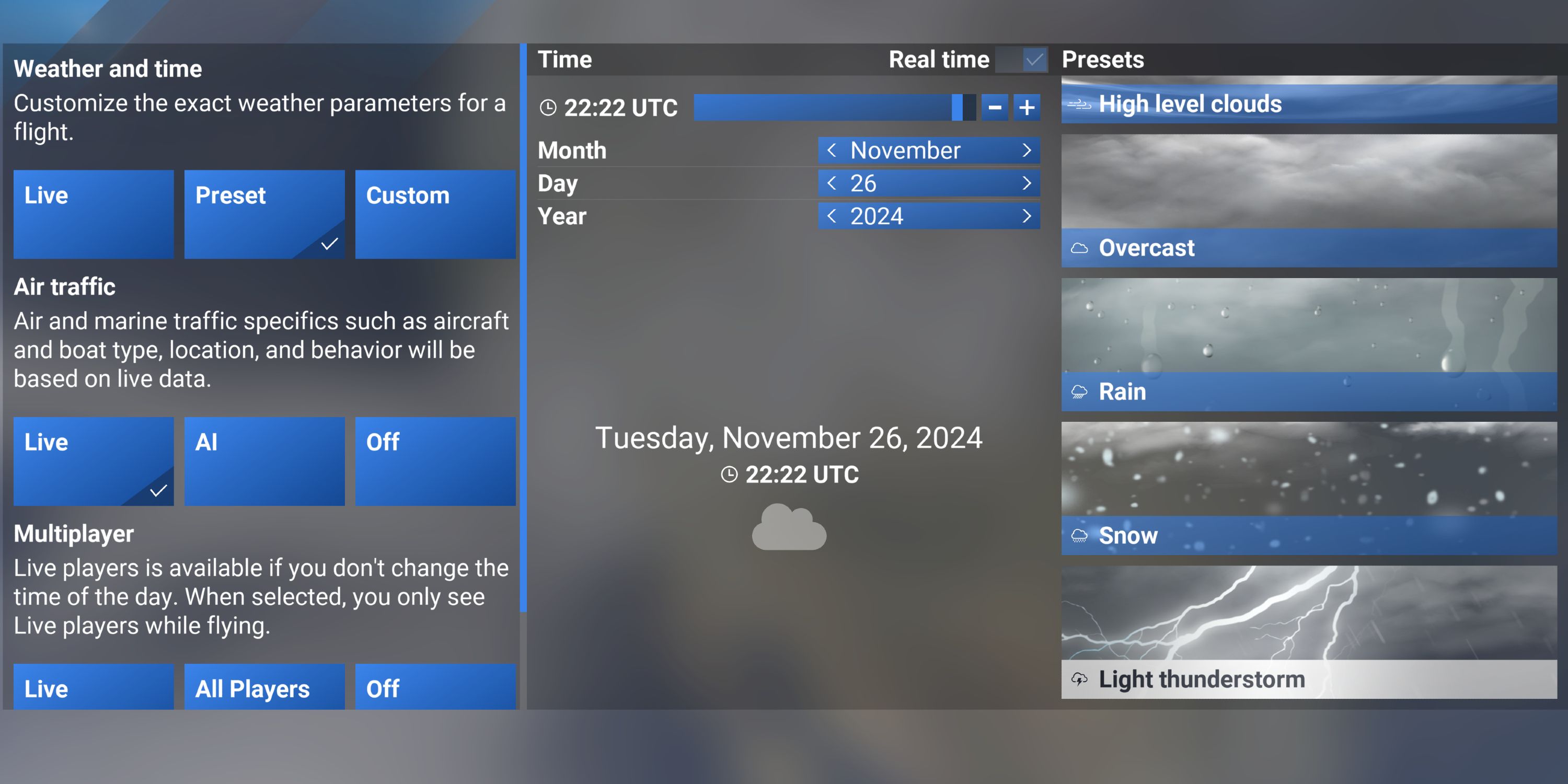
– Access the Weather Preset Menu: Before embarking on your flight, navigate to the weather settings:
– Live Weather: Connects to real-time METAR data to replicate current atmospheric conditions.
– Presets: Choose from predefined weather scenarios like clear skies, rain, storms, or create a custom configuration.
– Manual Sliders: Utilize adjustable sliders to fine-tune various weather elements:
– Humidity: Modify levels that will influence fog and visibility.
– Temperature: Important for simulating realistic aircraft performance.
– Pressure: Critical for accurate altimeter readings.
– Cloud Layers: Design custom cloud formations for dynamic visual effects.
2. Advanced Customization (New to 2024)
– Snow Depth Control: Users can set up snow coverage, impacting the overall appearance of terrain textures.
– Humidity Settings: Adjustments here will correlate closely to visibility and fog effects, creating a more immersive flying experience.
– Lightning and Pressure Adjustments: These settings allow for the tuning of storm severity, enhancing the realism of challenging weather scenarios.
Mid-Flight Changes
– PC Controls: Hover your cursor at the top of the screen and click the cloud icon to modify weather settings on the fly.
– Xbox Controls: Activate cursor mode by pressing RB + L3, then select the weather icon from there.
– Real-Time Adjustments: You can change time of day, cloud coverage, and wind direction instantaneously. Be aware that during these transitions, the simulation may experience brief pauses or hitches.
—
Key Settings and Effects
| Setting | Impact | Notes |
|—————–|———————————-|—————————————–|
| Humidity | Affects fog density and visibility| Higher humidity can lead to hazy skies.|
| Temperature | Influences aircraft performance | Key for lift and engine efficiency. |
| Snow Depth | Alters terrain appearance | Works in conjunction with seasonal changes. |
| Pressure | Affects altimeter readings | Use QNH settings for optimal realism. |
—
Troubleshooting Tips
– Settings Reset Issue: Be mindful that “Live Weather” may automatically override any chosen presets during flight, which is a concern noted by players in previous versions.
– Performance Lag: If you encounter performance issues during dynamic weather changes, consider lowering the detail of cloud settings.
– Community Mods: Enhancing your weather visuals using community-created additions can significantly improve your experience, especially if default options feel somewhat limited.
—
Looking Ahead to Microsoft Flight Simulator 2025
While there is currently no official announcement regarding a “Flight Simulator 2025,” speculation suggests future versions may enhance weather simulation capabilities. Expected improvements could include:
– Advanced Atmospheric Modeling: More sophisticated representation of cloud dynamics, weather systems, and their interplay with terrain.
– Interactive Weather Events: Expect features catering to unique weather phenomena that could impact flight strategies.
– Improved Realism in Customization Options: Further enhancements to the manual adjustment settings, offering even finer control over environmental conditions.
In summary, Microsoft Flight Simulator 2024 provides a robust platform for managing weather conditions, offering players various methods to enhance their flight experience. With advancements anticipated for future releases, the flight simulation community can look forward to even greater realism and interactivity.



Leave a Reply