
In “Metroid Dread,” navigating through the game effectively requires a keen understanding of the areas that necessitate specific upgrades, alongside a well-planned approach to backtracking. Below is a comprehensive guide that will assist you in identifying necessary upgrades, exploring previously inaccessible regions, and utilizing strategic backtracking to enhance your gameplay.
Identifying Areas Requiring Upgrades
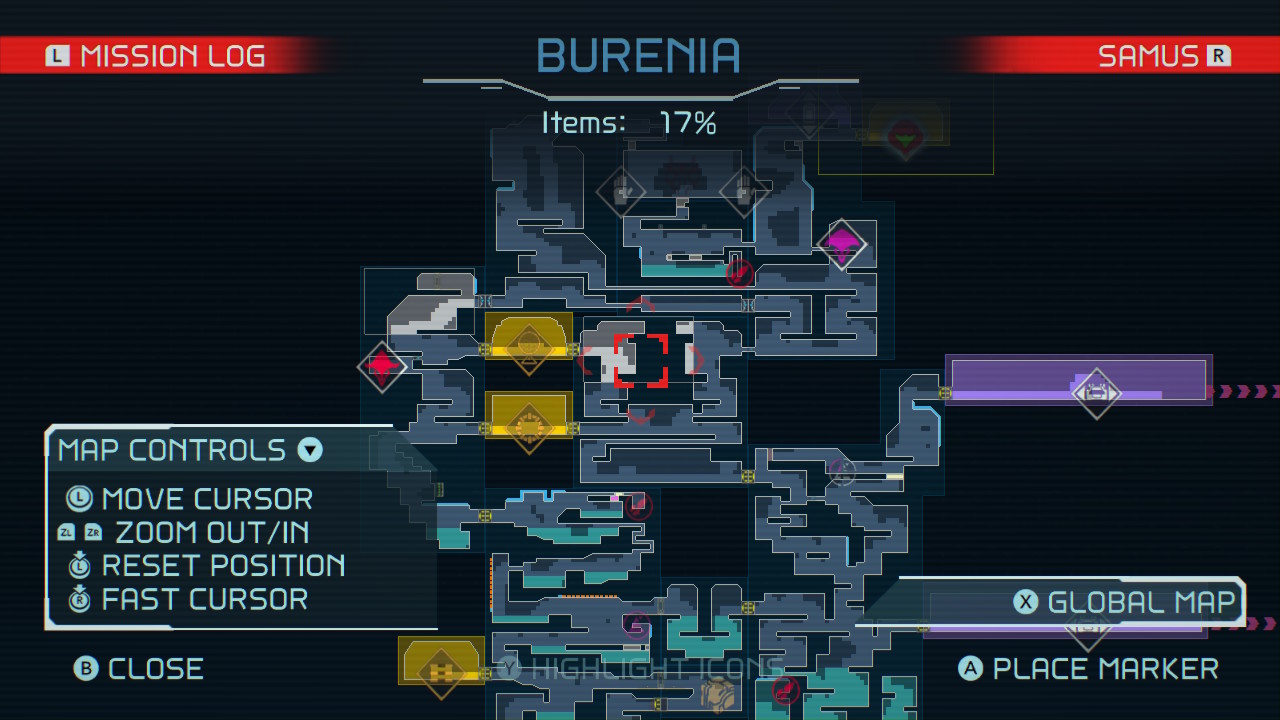
1. Utilize the In-Game Map:
– Familiarize yourself with the detailed map layout. Keep an eye out for doors marked with unique symbols that indicate specific upgrades (e.g., missile doors, morph ball paths).
– Review any unexplored sections, as they may signal areas that can only be accessed by certain upgrades or abilities.
2. Recognize Barriers and Hazards:
– Identify areas obstructed by hazards, such as electric shields, lava pits, or dense blocks that require targeted upgrades to bypass.
– Pay attention to environmental cues that suggest the need for particular abilities.
3. Seek Visual Upgrade Indicators:
– Look out for bright blue sections on walls, which signify where the Spider Magnet can be utilized. These areas often conceal hidden paths or critical items.
Backtracking to Unlock Areas
1. Track Your Upgrades:
– After obtaining an upgrade, make a note of its functionality and revisit previously inaccessible locations to exploit this new ability.
– Regularly cross-reference your upgrade log with your current map exploration status.
2. Explore Newly Accessible Paths:
– Use your recent upgrades to unlock new regions that can lead to further upgrades, energy tanks, or missile expansions. Move logically from area to area to reveal hidden treasures.
3. Employ the Spider Magnet:
– Activate the Spider Magnet in identified sections to scale walls and uncover hidden rooms or upgrades. This can open up surprising areas and items not visible from standard exploration.
4. Utilize Missile and Power Bomb Slots:
– Destroy blocks or specific doors that were previously unbreakable with missiles or power bombs. Certain areas may only be opened this way, revealing new paths or items.
Key Upgrades and Their Uses
– Charge Beam: Opens specific doors and allows for a more powerful shot.
– Spider Magnet: Enables vertical climbing on designated surfaces.
– Phantom Cloak: Grants temporary stealth, making it easier to navigate past enemies.
– Morph Ball: Accesses small passages that lead to hidden areas.
– Diffusion Beam: Fires a wide-spreading shot for area control.
– Speed Booster: Facilitates rapid movement, crucial for timed puzzles and sections.
– Grapple Beam: Let’s you cross gaps and swing across chasms.
– Super Missile: Deals greater damage to tougher enemies or structures.
– Ice Missile: Freezes enemies for strategic advantage.
– Storm Rockets: Essential for tackling certain tougher boss encounters.
– Space Jump: Grants multi-directional jumping, allowing traversal over larger gaps.
– Screw Attack: Instantly destroys enemies upon contact during jumps.
– Power Bomb: Clears an area and destroys significant barriers.
Strategic Backtracking Tips
1. Regular Revisitations:
– Develop a routine of returning to resolved areas after obtaining upgrades, as many paths that were once blocked may now be open.
2. Map Planning:
– Before embarking on backtracking, check your map for sections that correspond to your recent upgrades to efficiently plan your movements.
3. Hidden Item Discovery:
– Don’t overlook potential hidden items during backtracking. Many upgrades and enhancements can only be found by revisiting earlier stages under new conditions.
By adopting these strategies, you can maximize your exploration and progression in “Metroid Dread.” Whether you are uncovering hidden areas or collecting essential items, strategic exploration and understanding the interplay of upgrades will greatly enhance your gameplay experience.
Additional Resources
For more in-depth walkthroughs and specific upgrade locations, refer to comprehensive guides on platforms like IGN or Game8. These resources provide detailed maps and strategic insights for every region in “Metroid Dread,” ensuring you won’t miss a crucial upgrade or item on your journey.


Leave a Reply