
Mastering the weapon wheel and quick-select system is essential for maximizing your combat effectiveness in DOOM Eternal. Understanding the nuances of these features can greatly improve your reaction time and adaptability in the heat of battle. Here’s a thorough guide to help you harness these systems to their fullest potential.
Understanding the Weapon Wheel
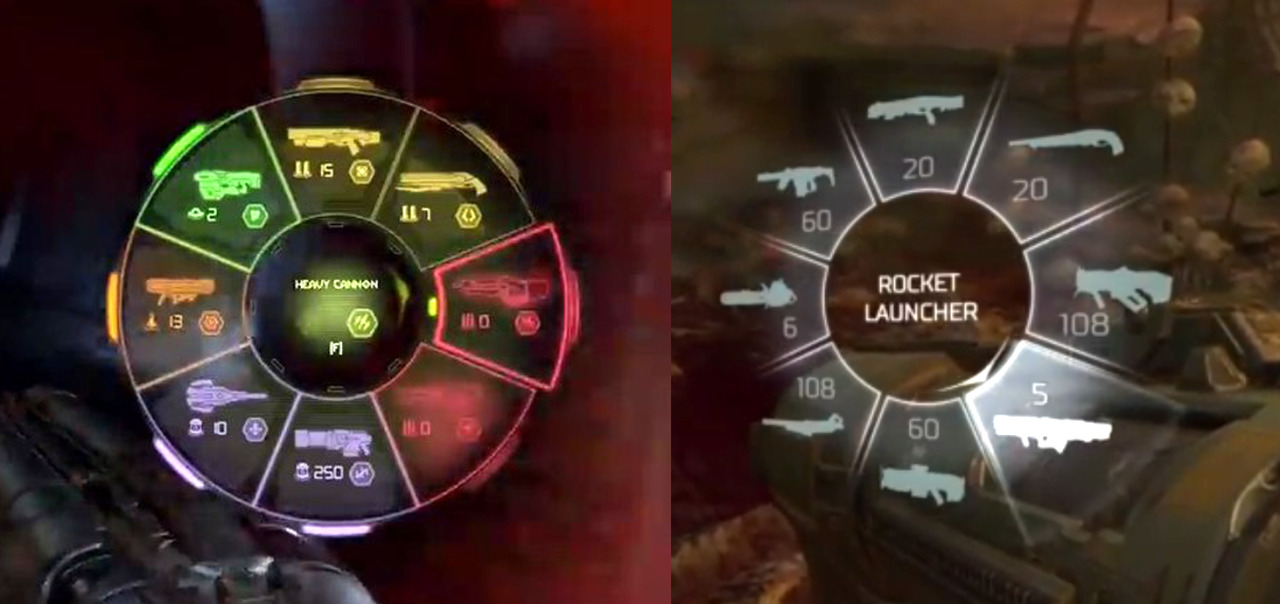
The weapon wheel serves as a pause feature, allowing players to take stock of their arsenal and select weapons strategically. While this is beneficial for planning, it can slow down your tempo during fast-paced encounters.
Steps to Use the Weapon Wheel:
1. Accessing the Weapon Wheel:
– On consoles, press the designated button (often the d-pad or a face button).
– On PC, use the corresponding key assigned to the weapon wheel.
2. Selecting a Weapon:
– Navigate through the wheel using the analog stick or the mouse. Take note of the positioning of each weapon to reduce selection time.
– Quick taps in the direction of your desired weapon can speed up the selection process.
3. Quickly Closing the Wheel:
– The wheel will automatically close once you select a weapon, allowing you to resume combat without delay.
Quick-Select System
The quick-select system allows swift transitions between weapons you’ve recently used, boosting your speed and efficiency during enemy encounters.
Steps to Use Quick-Select:
1. Previous Weapon Swap:
– Press the weapon wheel button twice to revert to your most recently used weapon, enabling rapid weapon changes during combat.
2. Customizing Quick-Select:
– Adjust your control settings to prioritize certain combinations—this can streamline the swapping process, making it faster and more efficient.
Tips for Effective Use
– Memorize Weapon Locations: Develop a mental map of where each weapon is positioned on the wheel for quicker access.
– Pre-Select Critical Weapons: Before entering high-stakes encounters, select weapons that suit the challenge (like shotgun for close-range or explosives for larger enemies).
– Customize Controls: If available, reassign controls to enhance your comfort and efficiency while switching weapons.
Advanced Techniques
1. Disabling Auto-Switch:
– Adjust your settings to disable the auto-switch feature when your ammo runs dry. This keeps you in control and prevents unintended weapon changes during intense moments.
2. Using the Steam Deck’s Virtual Wheel:
– For Steam Deck users, utilize the virtual wheel function set up with the trackpad for faster weapon selection, bypassing the joystick and enhancing accessibility.
Conclusion
By mastering the weapon wheel and quick-select system in DOOM Eternal, you can navigate the chaotic battlefield with ease. These techniques will not only enhance your combat capabilities but also ensure that you are always prepared for any challenge that comes your way, allowing you to maintain the fast-paced essence that defines the DOOM experience. Keep practicing these methods to refine your skills and dominate your enemies!


Leave a Reply