
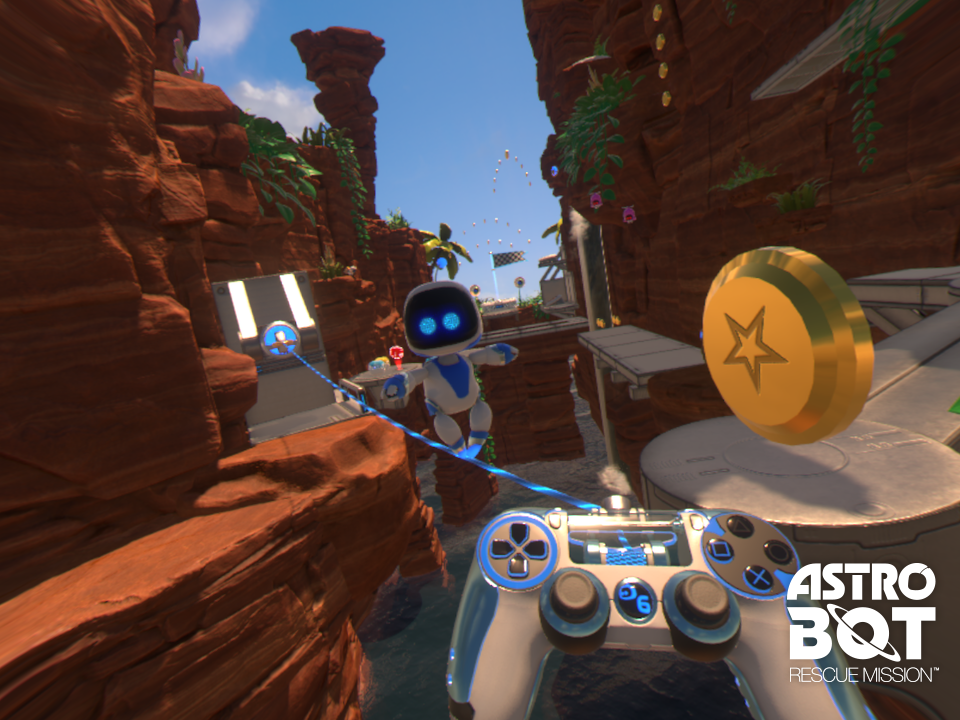
In Astro Bot Rescue Mission, a standout feature is its utilization of motion controls that leverage the capabilities of the PlayStation 4 DualShock controller’s gyro sensor. This innovative approach allows players to directly interact with the game world through physical movements of the controller, making the experience highly immersive and intuitive.
Key Features of Motion Controls in Astro Bot Rescue Mission:
1. Interactive Manipulation:
– Players can engage with various environmental objects by physically tilting, shaking, or pointing the DualShock controller. This hands-on approach enhances the sense of presence within the game, creating a dynamic interaction with gadgets and obstacles.
2. Contextual Movement:
– Specific segments of the game require the player to utilize motion gestures to perform actions. For example, flying a ship or flipping robots involves spatial movements that correspond to the player’s real-world actions. This responsiveness to movement not only deepens engagement but also adds an element of fun to the platforming mechanics.
3. Controller Tilt Assist:
– For players who prefer a more traditional control scheme, Astro Bot Rescue Mission includes an option known as Controller Tilt Assist. When activated, this feature disables motion controls and allows players to execute actions using the left stick and buttons. This flexibility ensures that all players, regardless of their comfort with motion controls, can enjoy the game.
Summary of Motion Control Usage:
– Engage with the VR environment by moving or tilting the DualShock controller.
– Perform specific actions like flying or flipping using motion gestures.
– Utilize the Controller Tilt Assist feature to switch to traditional input methods if desired.
In essence, the combination of motion controls and traditional inputs in Astro Bot Rescue Mission enriches the VR platforming experience, catering to a wide range of player preferences while promoting an engaging and interactive gameplay environment.


Leave a Reply