
In the game Control, fast travel is a key gameplay mechanic that enables players to navigate the vast and interconnected environment of the Oldest House efficiently. Here’s a detailed breakdown of how the fast travel system works:
Control Points Overview
– Control Points: There are a total of 29 Control Points scattered throughout the game’s architecture. Almost every location you visit will have a Control Point nearby, ensuring that you’re never too far from one.
– Cleansing Control Points: Before a Control Point can be used for fast travel, it must first be cleansed of The Hiss corruption. This involves engaging in combat to defeat enemies present in that area, thus restoring the Control Point to its original state.
Fast Travel Mechanics
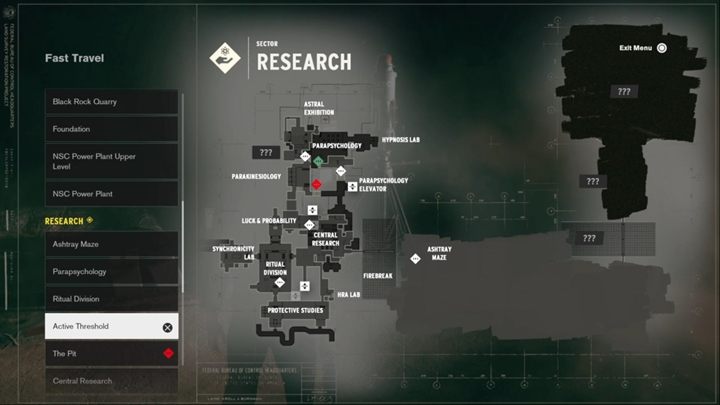
– Activating Fast Travel: Once a Control Point is cleansed and activated, you can interact with it to access the fast travel menu. From this menu, you can select any other active Control Point to teleport to instantly. This feature allows movement between different floors and sectors of the Oldest House.
– Combat Restrictions: It’s important to note that fast travel cannot be activated while in combat or in certain other restricted states. This means players need to be mindful of their surroundings and ensure safety before attempting to use the fast travel feature.
Additional Functions of Control Points
Beyond just facilitating fast travel, Control Points offer various functionality:
– Healing: Activating a Control Point will heal Jesse, your character, thereby replenishing health and enhancing survival during encounters.
– Accessing Abilities: Players can access Board Countermeasures and manage Astral constructs from these Control Points, allowing for character progression and strategic adjustments.
– Outfit Changes: Control Points also serve as locations where players can change Jesse’s outfit, adding a level of personalization to the character.
Fast Travel Summary
To utilize fast travel in Control, you’ll need to:
1. Locate and cleanse a Control Point in your current sector.
2. Access the fast travel menu at that Control Point once it’s activated.
3. Select the destination Control Point that you wish to travel to, as long as it has also been activated.
By strategically activating and utilizing Control Points, players can traverse the expansive world of Control more freely, enhancing both exploration and gameplay efficiency.


Leave a Reply