
To effectively customize your companions’ AI scripts in Pillars of Eternity II: Deadfire for optimal performance, follow these structured steps to access the AI settings, understand the customization options, and implement best practices for various roles in your party.
How to Access and Customize AI
1. Open AI Settings:
– Select a companion by clicking on their portrait.
– Right-click the gear icon to bring up the AI settings menu. Here you can choose between default AI modes, such as Aggressive or Cautious, or dive deeper into the Behavior Editor for custom AI script creation.
2. Choose Auto-Attack Behavior:
Decide from the following four auto-attack options:
– Passive: The companion does not engage in combat unless attacked.
– Self-defense: Engages in combat only when they are directly attacked.
– Defensive: Attacks any nearby enemies regardless of whether they are the focus of aggression.
– Aggressive: Actively seeks out and attacks all enemies.
Note: While these presets provide a basic behavior template, they cannot be individually customized beyond their initial settings.
3. Use the Behavior Editor:
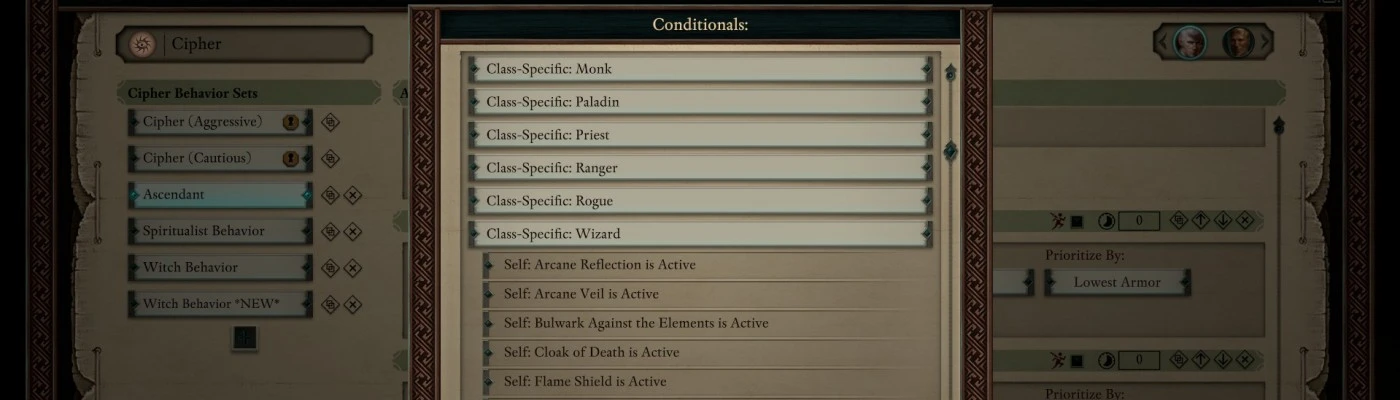
– Within the Behavior Editor, you can craft detailed AI scripts by defining:
– Conditions: Specify key factors that trigger action, such as health thresholds, weapon preferences, and status effects on allies or foes.
– Actions: Designate which abilities to activate, identify targets (self, ally, enemy), and establish action priority.
– By incorporating multiple behaviors, you can effectively program your companions to dynamically respond to shifting combat scenarios.
Best Practices for Optimal Performance
Implement the following strategies to maximize your companions’ effectiveness in combat without necessitating constant micromanagement:
– Healers:
Set healers to heal allies when their health drops to 75% or below (rather than the default 50%) for more proactive healing. Additionally, instruct them to prioritize crowd control (CC) and damage-dealing spells if no healing is needed, integrating a balanced mix of Cautious and Aggressive behavior.
– Tanks:
Employ a blend of Cautious and Aggressive tactics coupled with random target priorities to ensure they effectively absorb damage and engage foes without becoming overly focused on a single enemy.
– Strikers and Crowd Control:
Program these roles to utilize high-power abilities first and maintain Aggressive mode to effectively eliminate threats, enhancing overall efficiency in battles.
– Melee DPS / Off-tanks:
Assign an Aggressive stance with a focus on the highest-priority attacks to amplify damage output while contributing to the tanking efforts.
– Party Members with Off-Healing Capabilities:
Configure these characters to heal allies when their health falls to 25% or less, serving as a secondary safety net in combat scenarios.
Inspirations and System Design
The AI scripting system draws inspiration from advanced systems like the Final Fantasy Gambit system and the Dragon Age: Origins AI, allowing players to create nuanced, situation-responsive behaviors. The design supports the establishment of primary and secondary rules, enabling companions to revert to alternative behaviors when their preferred actions are impeded by conditions like status effects.
Conclusion
– Access AI via the gear icon from each companion’s portrait.
– Choose basic auto-attack modes or delve into the Behavior Editor for custom scripts.
– Set conditions and actions focusing on health thresholds, ability prioritization, and target selection to enhance combat efficacy.
– Follow the recommended strategies for various party roles to ensure smooth performance in battle.
– Utilize layered AI rules to promote adaptability and maintain combat effectiveness.
By adhering to these guidelines, your party will operate efficiently, demonstrating intelligent and adaptive behavior in the dynamic combat landscapes of Pillars of Eternity II: Deadfire.


Leave a Reply