
Gorogoa: A Guide to Panel Manipulation Mechanics
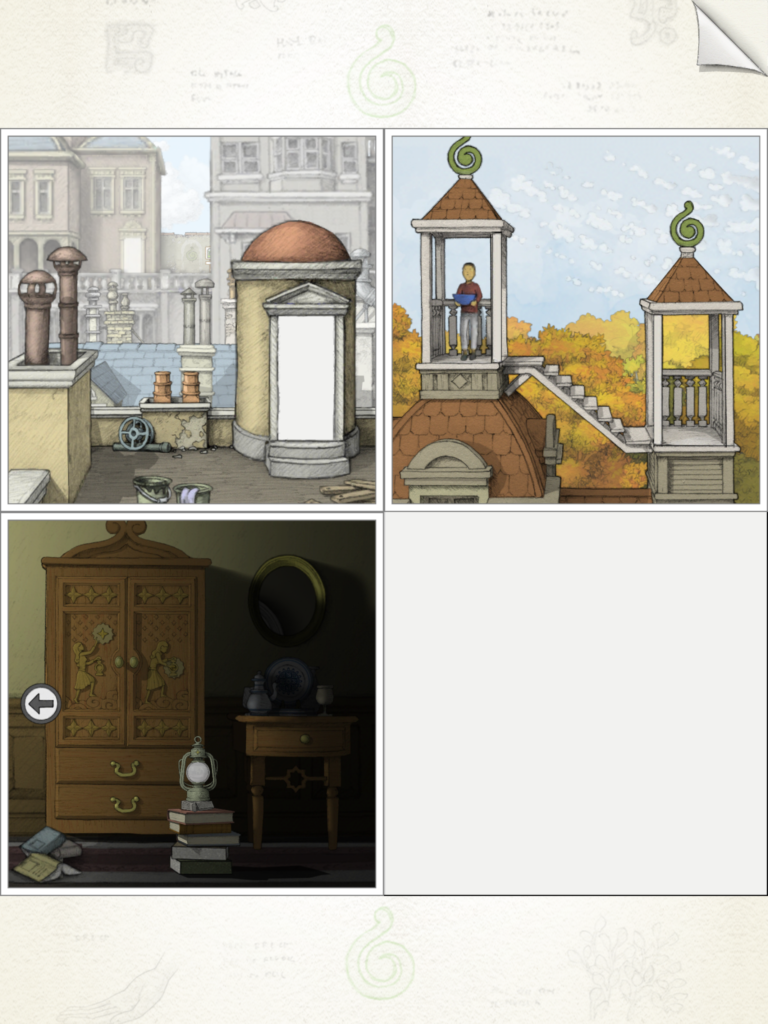
Gorogoa is an imaginative puzzle game that invites players to engage with its unique visual style and intricate mechanics through the manipulation of four panels displayed on the screen. Mastering how to interact with these panels is crucial for advancing through the game’s richly woven narrative.
Panel Manipulation Basics
1. Click and Drag:
– Selecting a panel allows players to reposition it within the 2×2 grid. With intuitive dragging mechanics, you can swap panels or place them in desired locations to explore different narrative sequences.
2. Zoom In and Zoom Out:
– Each panel is designed to be interacted with in detail. By clicking on specific areas within a panel, you zoom in to uncover hidden details or new sections. Conversely, zooming out restores the panel to a broader view, revealing essential transitions or solutions needed to progress in the game.
3. Splitting and Merging:
– Some puzzles necessitate a more complex interaction, where you may need to split a single panel into multiple panels or merge panels together. This can be accomplished by dragging one panel over another or splitting at strategic points highlighted during gameplay.
4. Layering and Alignment:
– Aligning panels can lead to new scenes or paths. For example, positioning one panel over another, such as a window over a wheel, facilitates interactions and uncovers functional aspects of the environment, allowing the protagonist to navigate through challenges.
Advanced Panel Mechanics
1. Interconnected Narratives:
– The panels are visually interconnected, meaning that interaction with one can influence another. This layered narrative approach encourages players to think critically about how panel manipulation affects the storyline and puzzle progression.
2. Time and Scene Shifts:
– Certain puzzles utilize the movement of panels to indicate a passage of time or transition between scenes. For instance, changing the positioning of a stair panel might alter the time of day or the scenery, emphasizing the dynamic nature of the game.
3. Disabling Panels:
– To prevent confusion, the game may lock certain panels or make them inactive as you progress through puzzles. This feature allows players to focus on currently relevant challenges, streamlining the gameplay experience.
Practical Example
Consider the following step-by-step approach to a specific puzzle:
1. Zoom Out: Begin by zooming out on a panel to unveil the complete image of a window.
2. Layer Panel: Next, drag this window panel over a cart wheel and wait for the images to align correctly.
3. Interaction Trigger: Allow the cart to move, which might cause the window image to rotate until a specific symbol, like a blue fruit, is positioned at the bottom.
4. Zoom Into Image: Once aligned, return the panel to its starting position and zoom in to reveal a set of stairs hidden within the image.
5. Final Layering: Overlay the stairs onto another panel to facilitate progression for the protagonist, allowing them to continue their journey.
Summary Table
| Action | Description |
|———————|——————————————————————————–|
| Click and Drag | Move or swap panels within the grid, enhancing exploration capabilities. |
| Zoom In/Out | Focus on intricate details or return to a global view for comprehensive context.|
| Split/Merge | Create new panels from existing ones or combine panels for complex solutions. |
| Layer/Align | Overlay or correctly position panels to reveal new narratives and paths. |
| Time/Scene Shifts| Trigger environmental changes and progress through time by manipulating panels.|
| Disabling Panels | Lock or deactivate panels once completed, avoiding distractions elsewhere. |
Conclusion
Gorogoa’s panel manipulation mechanics provide a visually captivating and intellectually stimulating puzzle experience. The intuitive actions of clicking, dragging, zooming, and aligning create a sense of accomplishment as players solve each intricate puzzle, further enriching the narrative journey[3][5].
/cdn.vox-cdn.com/uploads/chorus_asset/file/9865563/Gorogoa_Final_7_preview.png)


Leave a Reply