
Creating a course in Super Mario Maker is an engaging experience that allows for a vast array of creativity and design. Here’s a comprehensive guide to help you get started with your own course:
1. Starting the Course Creation:
– Begin by selecting a new empty save slot. This will prompt an option to “make a new course,” which, upon clicking, opens up a fresh canvas for you to work on.
2. Selecting Game Style:
– The default game style is often set to Super Mario 3D World, but you have the flexibility to choose from various styles such as Super Mario Bros., New Super Mario Bros., and more. This selection plays a crucial role in the overall aesthetic and mechanics of your course.
3. Using the Tool Palette:
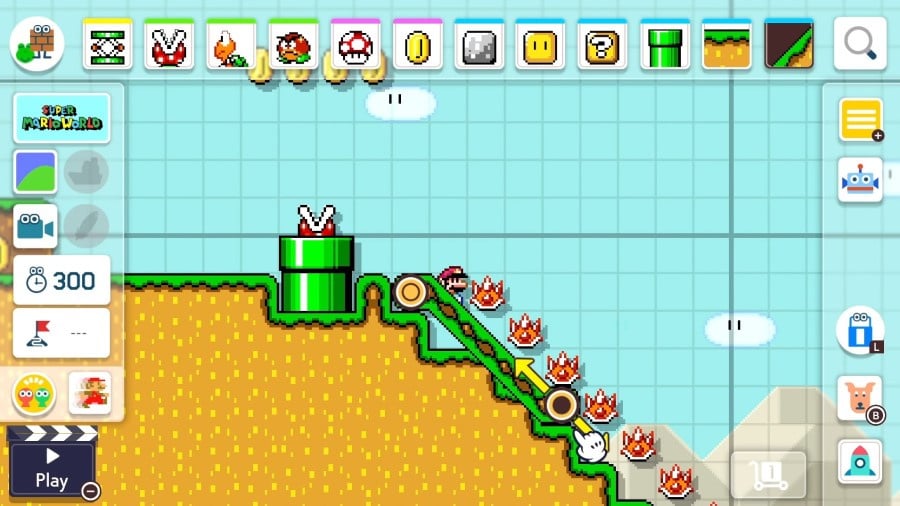
– Upon entering the course editor, you will be greeted by the Tool Palette. This is where your creativity takes flight. The palette is organized into rows of objects, enemies, and power-ups which you can easily drag and drop onto the course’s grid-based layout.
– Initially, you will have access to basic items like blocks, pipes, Goombas, and coins. As you continue to create and progress, additional tools and items will unlock, expanding your design possibilities.
4. Designing Your Course:
– Begin with a simple idea or theme that you wish to explore. It can be beneficial to conceptualize your course layout before diving into intricate detailing.
– Experiment by combining various elements—such as placing enemies on moving platforms or creating elaborate obstacle courses. Using modifiers can further enhance your gameplay mechanics. Hold and click on objects to access these options for added variety.
5. Iterative Testing:
– One of the key components of course design is continuous testing. After laying down your groundwork, click “Play” to test your level. This will allow you to experience the course as a player, ensuring it is enjoyable, fair, and challenging. Make adjustments as necessary to enhance flow and difficulty.
6. Final Touches:
– Once you are satisfied with your course design, you may want to consider adding finishing touches. This could involve fine-tuning the placement of items, altering enemy behavior, or incorporating visual elements that align with your initial theme.
In summary, creating a course in Super Mario Maker involves selecting a save slot and game style, utilizing the Tool Palette to place and manipulate objects and enemies, and consistently testing and refining your level design. By starting with a clear idea and gradually building complexity, you can develop an engaging course ready for players to enjoy. Happy designing!



Leave a Reply