
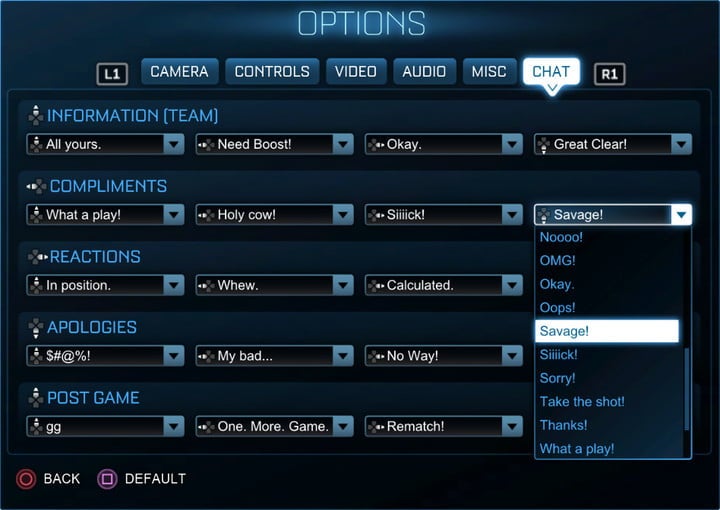
Quick Chat options in Rocket League serve as an essential tool for enabling efficient communication among teammates during the intense pace of matches. By utilizing pre-set messages that can be dispatched instantly, players can coordinate their plays, communicate vital information, and enhance teamwork without the need for voice chat or distracting typing.
Key Benefits of Quick Chat
1. Boost Communication:
Quick Chat allows players to convey their boost status clearly and quickly. For instance, a player can issue a “Need boost!” message to prompt teammates to share boost pads or be mindful of ongoing rotations. This type of communication is crucial for effective defense and strategic plays, ensuring that players are well-equipped for challenges.
2. Signaling Plays:
Effective coordination in Rocket League often hinges on timely passing. Utilizing the “Passing!” Quick Chat message alerts teammates to be ready to receive the ball, significantly increasing the likelihood of successful offensive maneuvers. This simple yet effective communication tool helps synchronize actions among players, leading to more fluid gameplay.
3. Sportsmanship and Team Morale:
Quick Chat allows for quick expressions of apology, thanks, or compliments, which contributes positively to team morale. For instance, sending a “Sorry!” after an accidental bump or “Nice shot!” to commend a teammate’s effort fosters a supportive atmosphere without hindering the flow of the game.
4. Situational Awareness:
Players can provide situational updates about their status which is vital for strategic decision-making. Messages informing teammates about boost levels, readiness for challenges, or strategic positioning can make a significant difference in how effectively a team operates during a match. This continuous flow of information aids in maintaining situational awareness across the team.
Customization and Versatility
Rocket League enhances the utility of Quick Chat by allowing players to customize and switch presets according to their preferences and the dynamics of their team. This level of personalization means that players can better adapt their communication style to fit various teammates and play strategies, making it an invaluable resource across different game settings—be it casual matches or high-stakes competitive play.
Conclusion
In summary, Quick Chat options in Rocket League are crucial for fostering fast, effective, and cooperative communication among teammates. By streamlining the sharing of important information and enhancing overall coordination, these pre-set messages significantly improve the gameplay experience, supporting both individual players and the team as a whole. Emphasizing teamwork and strategic play, Quick Chat remains an integral feature of Rocket League’s design, enriching the experience for players at all skill levels.

Leave a Reply