
Hold up, player! “Fortnite server,” you say? Sounds like you’re ready to drop into the digital battlefield, but maybe the connection’s got you doing the floss in slow motion, eh? Don’t worry, GameJinn is here to give you the ultimate intel on those crucial Fortnite servers. Let’s get you back to Victory Royales, not server woes!
Here’s the lowdown on everything Fortnite servers:
### Fortnite Server Status: Are You Ready to Drop or Stuck in the Lobby?
Alright, champion, let’s talk Fortnite servers! Nothing’s worse than gearing up for a Victory Royale only to find yourself staring at a connection error. Here’s your ultimate guide to understanding, checking, and optimizing your Fortnite server experience.
#### Current Server Status & Maintenance
As of February 6, 2026, Fortnite servers are generally operational. However, Epic Games frequently conducts scheduled maintenance for updates, which can take the servers offline. For mid-season patches, downtime typically lasts between 2 to 3 hours. Larger updates, like new seasons or chapters, can extend this downtime to 8-12 hours or even longer due to massive map changes and technical overhauls.
The last significant downtime for the v39.40 update concluded on February 5, 2026, with regular game services and matchmaking fully restored. The next anticipated server downtime is scheduled for February 19, 2026, at 09:00 UTC, for the v39.50 mid-season update. Remember, Epic usually disables matchmaking about 30 minutes before planned maintenance begins.
**How to Check Fortnite Server Status:**
Don’t get caught in the storm without knowing the forecast! Here are the most reliable ways to check if the servers are down:
* **Epic Games Status Page:** This is your official source for real-time updates on all Epic Games services, including Fortnite. It indicates if website, game services, login, matchmaking, and other features are operational, experiencing degraded performance, or undergoing a major outage.
* **Fortnite Status X (formerly Twitter) Page:** Epic Games often posts immediate updates regarding server downtime and issues on their dedicated Fortnite Status account on X.
* **Third-Party Status Trackers:** Websites like DownDetector can also provide real-time player reports on outages.
#### Fortnite Server Locations: Where’s Your Battleground Data?
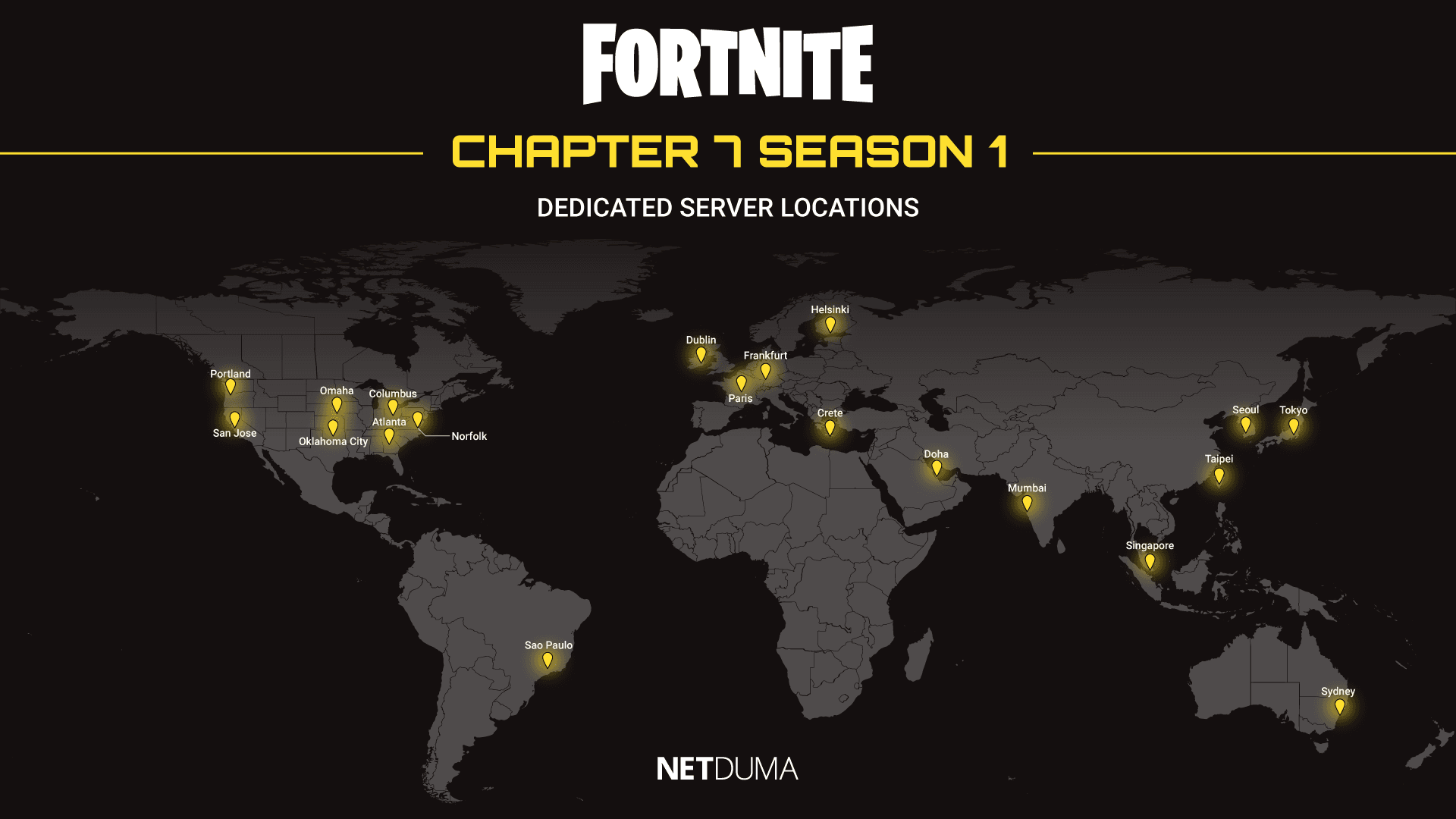
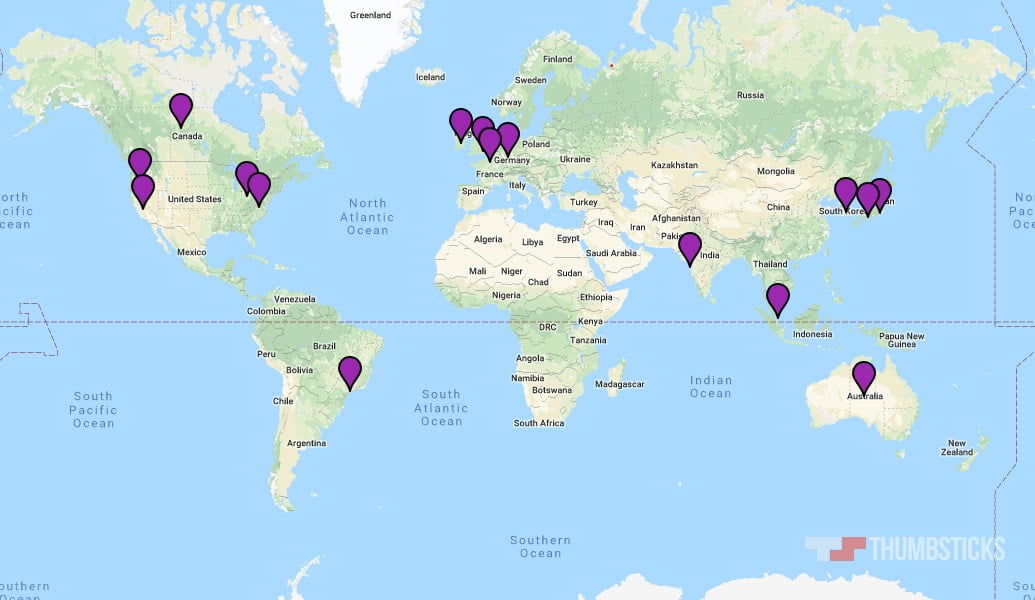
Fortnite boasts a global network of servers to ensure players get the best possible connection. The closer you are to a server, the lower your ping, which is crucial for competitive play and a smooth experience.
Epic Games has data centers in the following regions:
* **North America:** East, West, and Central. Specific estimated cities include Ohio, Virginia, California, Texas, and Toronto.
* **Europe:** This region includes multiple server locations such as London, Paris, Ireland, Frankfurt, Milan, and Helsinki.
* **Brazil**
* **Oceania:** Covering Australia, New Zealand, and South Pacific Islands.
* **Asia:** Including locations like Tokyo, South Korea, Osaka, Singapore, and Mumbai.
* **Middle East:** Covering the Arabian Peninsula, East Africa, and South Asia.
While Epic Games doesn’t publicly reveal the *exact* city for every server to prevent pros from camping out, they do provide regional breakdowns. The game aims to connect you to the server with the lowest ping, especially when your “Matchmaking Region” is set to “Auto”.
#### Battling Lag and Connection Issues: Your Arsenal of Tips and “Hacks”
Lag can turn a Victory Royale into a rage quit faster than you can say “storm sickness.” Here’s how to fight back against high ping and connection woes:
1. **Check Fortnite Server Status FIRST:** Before you start troubleshooting your own setup, always confirm that the issue isn’t on Epic’s end.
2. **Restart Everything:** A classic for a reason! Power cycling your PC/console, router, and modem can clear out temporary glitches.
3. **Wired Connection is King:** Ditch the Wi-Fi if you can! An Ethernet cable provides a more stable connection with lower latency compared to wireless, reducing signal interference and drops.
4. **Optimize Matchmaking Region:** In Fortnite’s settings, ensure your “Matchmaking Region” is set to “Auto” or manually select the region geographically closest to you for the lowest ping.
5. **Close Background Applications:** Streaming services, downloads, or other online games hog bandwidth. Close anything unnecessary running in the background.
6. **Lower Graphics Settings:** High graphics quality demands more data transmission, which can strain your internet connection. Experiment with lower resolutions, turn off anti-aliasing, reduce 3D resolution, and set shadows, reflections, textures, and effects to medium or low.
7. **Disable Cosmetic Streaming:** In the Epic Games Launcher, you can pre-download streamed assets. This prevents the game from downloading textures as you play, reducing network strain during matches. Be aware this requires additional storage space.
8. **Update Drivers:** Outdated display and network drivers can cause lag. Keep them updated!
9. **Flush DNS and Change DNS Servers:** Clearing your DNS cache can resolve corrupted entries, and switching to a public DNS (like Google’s 8.8.8.8) might offer better routing.
10. **Game Mode Settings (PC):** Windows’ Game Mode prioritizes your game over background processes, potentially lowering ping. However, some players find turning it off can yield higher FPS by reducing CPU/GPU strain. Experiment to see what works best for your system.
11. **Consider a Gaming Router:** Routers with features like Geo-Filter (to force connection to the closest server), Steady Ping (to stabilize connection), and SmartBOOST (to prioritize gaming traffic) can significantly improve your experience.
12. **VPN (Use with Caution):** While not a guaranteed fix, a VPN *might* reduce lag by providing a more direct route to game servers or preventing your ISP from throttling your gaming traffic. Connect to a VPN server in the same region as your chosen Fortnite server.
13. **Check Your Internet Speed:** Fortnite generally requires at least 15 Mbps download and 3 Mbps upload for smooth play, but aiming higher (10-15 Mbps download, 5-10 Mbps upload) is recommended. If all else fails, it might be time for an internet upgrade!
So, there you have it, player! With this knowledge, you’re now equipped to tackle any server-related shenanigans and get back to dominating the island. Now go forth and conquer!



Leave a Reply