
Alright, fellow gamer! You’re looking to conquer the digital arena of Twitch, and that’s a quest I can definitely help you with. Streaming effectively isn’t just about hitting “Go Live”; it’s about strategy, setup, and a whole lot of personality. Let’s dive into how you can level up your Twitch game!
So, you want to become a Twitch legend, eh? Excellent choice! It’s not just about firing up your game; it’s about crafting an experience that keeps viewers hooked. As GameJinn, I’ve seen countless players try to speedrun their way to streaming success, but the real pros know it’s a marathon, not a sprint. Here’s your ultimate guide to streaming effectively on Twitch:
### I. The Foundation: Your Technical Arsenal
Before you can dazzle the masses with your gaming prowess, you need the right gear and software. Think of it as your character’s starting equipment.
1. **A Powerful PC (or Console + Capture Card):**
* **PC:** You’ll need a machine that can run your games smoothly *and* handle the encoding for your stream simultaneously. A good GPU (graphics card) is crucial for better performance, especially if you use GPU encoding.
* **Console:** If you’re a console gamer, you’ll need a capture card to send your game’s video and audio to your PC for streaming. Lightstream is a cloud-streaming option for console gamers without a PC.
2. **Stable Internet Connection:** This is your lifeline! A stable internet connection with at least 5 Mbps upload speed is essential to prevent buffering and ensure a smooth experience for your viewers.
3. **Quality Audio is KING (Microphone & Headset):**
* **Microphone:** Viewers will tolerate mediocre video more than bad audio. Invest in a high-quality microphone (like a Blue Yeti USB) to ensure your voice is clear and free from distortion or background noise.
* **Headset:** A comfortable headset allows you to hear game sounds and viewer interactions without echo.
4. **Clear Visuals (Webcam & Lighting):**
* **Webcam:** A good quality camera (at least 1080p, 4K is even better) is vital for clear visual communication, helping you connect personally with your audience.
* **Lighting:** Proper lighting enhances video quality, making you well-lit and visible, which is crucial for viewer engagement.
5. **Streaming Software:** This is the control panel for your broadcast.
* **OBS Studio:** The “gold standard” and best free option. It’s open-source, offers unparalleled flexibility, and provides professional-grade broadcasting capabilities. It requires some technical knowledge to configure but offers maximum quality, control, and stability.
* **Streamlabs Desktop:** A popular choice for beginners, it’s a fork of OBS Studio with a more user-friendly interface, pre-built overlays, and integrated alerts. It’s great for those who want a quick path to a professional-looking stream.
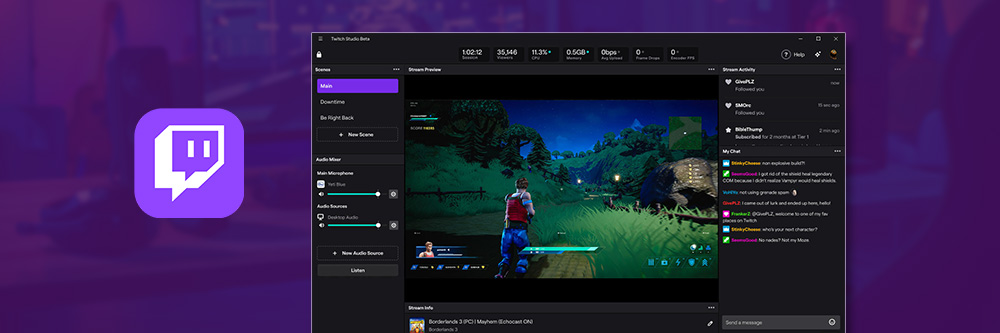
* **Twitch Studio:** A simpler, free option for beginners who only stream to Twitch, offering a guided setup.
* **Prism Live Studio:** Recommended for multi-platform streaming and mobile creators.
6. **Setting Up Your Software (e.g., OBS Studio):**
* Download and install your chosen software.
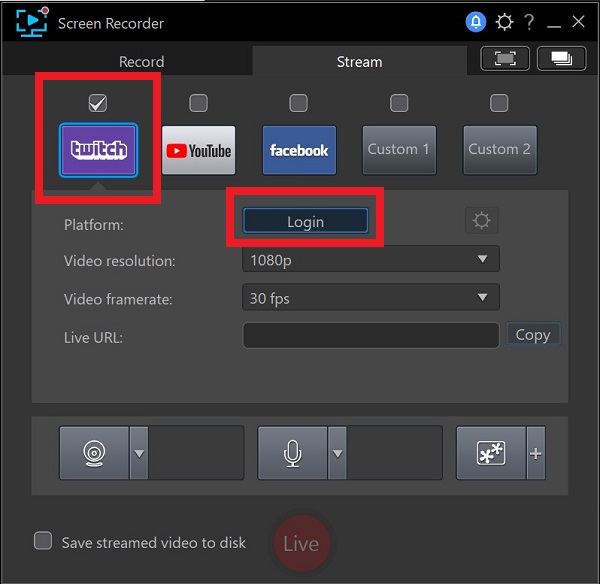
* Go to settings, select “Stream,” and choose Twitch as your service.
* Copy your Stream Key from your Twitch dashboard (Settings > Stream Key) and paste it into the software.
* Add sources for your game capture, webcam, and microphone.
* Configure your output settings: a video bitrate of around 3500, encoder set to GPU (NVENC or AMF) or Software (x264), audio bitrate to 160, and output resolution to 1280×720 at 60fps is a common starting point.
* **Always test your stream before going live!**
### II. Crafting Your Content & Niche: The Quest Begins
You wouldn’t enter a boss fight without a strategy, would you? Your content is your strategy.
1. **Find Your Niche & Differentiate:** What makes *your* stream unique? Are you a skilled player, a hilarious commentator, or a chill community builder? Lean into your strengths. Research other streamers in your genre to see what works and how you can offer something different.
2. **Consistent Schedule:** Viewers are more likely to return if they know when to find you. Establish a regular streaming schedule and stick to it. Starting with three hours, three times a week, is a good recommendation.
3. **Plan Your Streams:** Don’t just hit “Go Live.” Plan out your stream to ensure it’s entertaining and provides good content for clips.
4. **Always Be Talking:** Even if your viewer count is zero, talk as if you have an audience of 20. Narrate your gameplay, react to events, or share personal stories. This helps you practice engaging and keeps the “dead air” to a minimum.
### III. Engaging Your Community: Building Your Guild
Twitch is all about interaction. Your viewers aren’t just spectators; they’re part of your adventure!
1. **Acknowledge and Respond:** Greet new viewers by name, thank them for joining, and respond to questions in chat. This creates a personal connection.
2. **Interactive Content:**
* **Q&A Sessions:** Host dedicated Q&A sessions or answer questions during quieter moments.
* **Play Along:** Consider playing multiplayer games with viewers or hosting game nights.
* **Polls & Voting:** Let your audience influence decisions, like what game to play next or what to do in-game.
* **Giveaways & Chat Games:** Hold giveaways for game keys or in-game items, or play party games like trivia.
* **Channel Points:** Use Twitch’s channel points for fun dares or sound effects.
3. **Leverage Chat Bots & Overlays:** Bots like Nightbot or StreamElements can automate tasks, welcome new viewers, run polls, and manage chat. Alerts for follows, subscriptions, and donations are essential to thank your audience in real-time.
4. **Build a Discord Community:** Discord is an excellent tool for keeping your community engaged even when you’re offline.
### IV. Presentation & Branding: Your Character’s Aesthetic
Your channel’s look and feel are your brand identity. Make it memorable!
1. **Create a Strong Brand Identity:**
* **Username:** Choose a short, concise, and memorable username. It’s difficult to change later without losing followers.
* **Logo & Profile Picture:** Design a unique and recognizable logo that reflects your content and personality. It should be adaptable and versatile across platforms. Your profile picture can be your logo or a professional photo.
* **Color Palette & Typography:** Choose colors and fonts that evoke the desired emotions and align with your brand personality.
* **Core Message & Style:** Define what your brand stands for and its overall aesthetic.
2. **Customize Your Channel:**
* **Channel Banner:** Design a banner that reflects your branding and provides key information like your streaming schedule or social media handles.
* **Twitch Panels:** Create informative and branded panels for sections like “About Me,” “Schedule,” “Social Media,” and “Donations.”
* **Overlays & Alerts:** Use custom overlays (webcam frames, chat boxes) and alerts for new followers, subscribers, and donations to enhance your stream’s visual appeal and reinforce your brand.
* **Stream Screens:** Utilize “Starting Soon,” “Be Right Back,” and “Offline” screens that maintain visual consistency.
### V. Monetization: Earning Your Loot
Once you’ve built a loyal community, you can start earning some gold!
1. **Twitch Affiliate Program:** This is your first major milestone. You’ll need at least 50 followers, 8 hours of total streaming, 7 days of streaming, and an average of 3 viewers. Becoming an Affiliate unlocks basic monetization features.
2. **Revenue Streams (Affiliate & Partner):**
* **Subscriptions:** Viewers pay a monthly fee for perks like custom emotes, badges, and ad-free viewing. As an Affiliate, you typically get a 50/50 split.
* **Twitch Bits:** Viewers buy and “Cheer” Bits in chat, and you earn $0.01 per Bit.
* **Advertisements:** Running ads during your stream provides passive income.
* **Donations:** Third-party platforms like StreamElements or Streamlabs allow viewers to donate directly, often giving you a higher percentage.
* **Sponsorships:** Partner with brands for cash, promotional deals, or products.
* **Merchandise:** Selling custom merch allows viewers to support you and carry your brand.
* **Affiliate Marketing:** Earn commissions by recommending products through unique referral links.
### VI. Growth Hacks & Continued Leveling: The Grind Never Stops
1. **Cross-Platform Promotion:** Don’t rely solely on Twitch’s algorithm. Promote your streams and content on other social media platforms like TikTok, YouTube (for highlights and VODs), Instagram, and Twitter. Short-form content on these platforms is crucial for driving new viewers to your Twitch channel.
2. **Network with Other Streamers:** Collaborate with streamers who have a similar audience. This helps you reach new viewers and creates more engaging content. Raid other streamers before ending your stream.
3. **Analyze and Optimize:** Use Twitch analytics to understand your audience and refine your strategies.
4. **Be Genuine:** Viewers can tell when you’re not being authentic. Let your personality shine through.
5. **Don’t Fear the Zero Viewer Count:** Talk as if people are watching, because someone might be lurking, and it helps you practice.
Remember, becoming an effective Twitch streamer is an ongoing process of learning, adapting, and engaging. Focus on creating a welcoming, inclusive community, and the rest will follow. Now go forth, brave streamer, and conquer!


Leave a Reply