
To enjoy cross-platform gameplay with friends in Call of Duty: Black Ops 6, follow these comprehensive steps to set up crossplay, add friends, and manage your gaming experience effectively.
Enabling Crossplay
1. Launch Black Ops 6: Begin by starting the game on your chosen platform: PC, PlayStation, or Xbox.
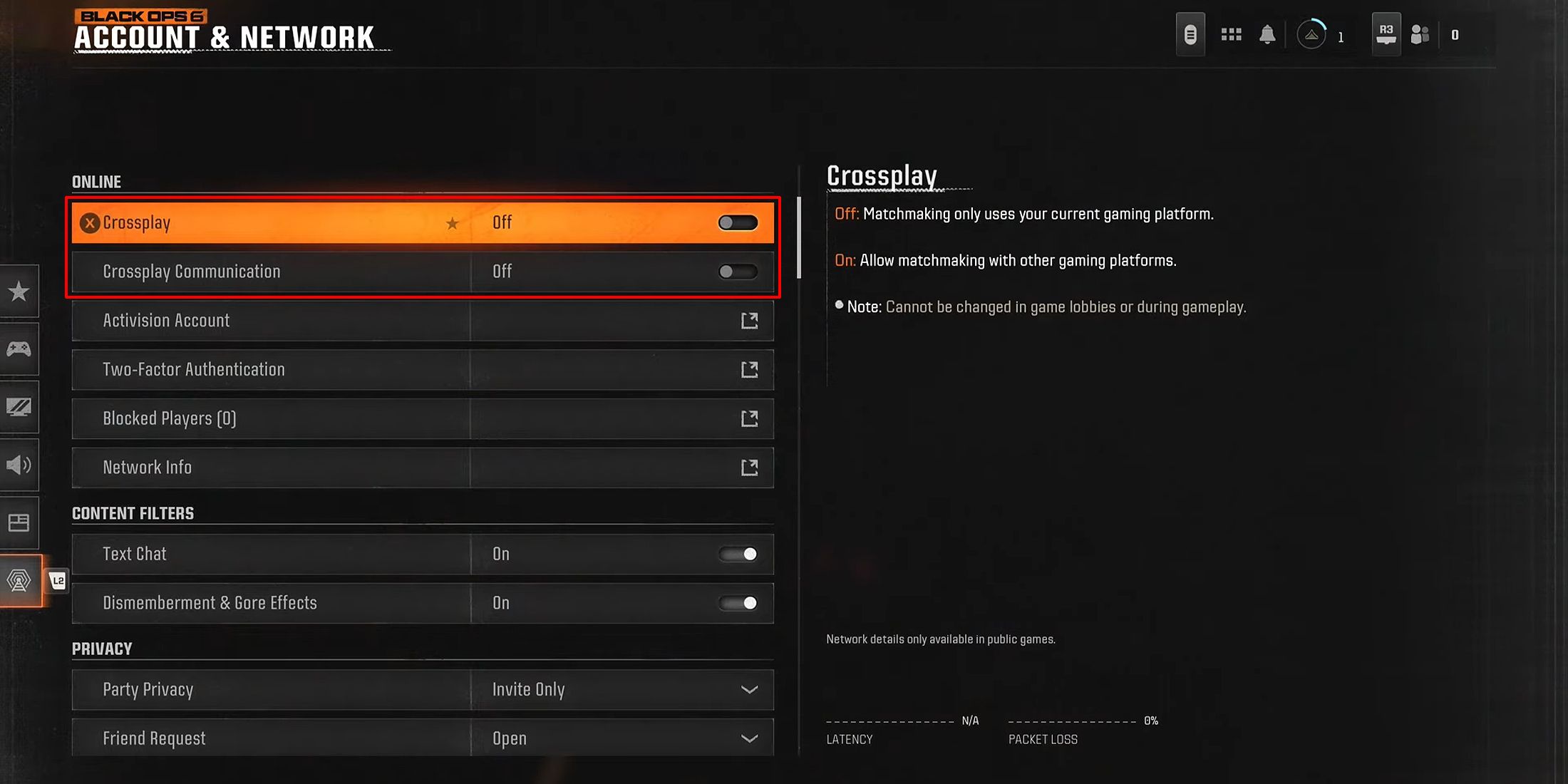
2. Navigate to Settings: Access the main menu of the game and select the “Settings” option.
3. Find the Crossplay Option: Look for the “Account & Network” section. On certain platforms, this setting may be categorized under a different title like “Account.”
4. Enable Crossplay: Ensure that the crossplay feature is activated. It may be labeled as “Enable Crossplay” or a similar phrase. For players on PlayStation, this option is typically found directly in the “Account & Network” settings.
Adding Friends Across Platforms
1. Open the Social Menu: From the main menu or while in-game, navigate to the “Social” menu.
2. Add Friend Using Activision ID: Select the “Add Friend” option and input your friend’s Activision ID, which is formatted like “Name1234567”. This unique identifier allows you to connect with players using different platforms.
3. Send Friend Request: Complete the request process by providing any additional necessary information, and wait for your friend to accept your invitation.
4. Invite Friends to Game: After your friend accepts your request, locate them in your friends list and choose either “Invite to Party” or “Invite to Game” to include them in your multiplayer session.
Additional Considerations
– Stable Internet Connection: A reliable and fast internet connection is crucial for a smooth gaming experience. This will help minimize lag and packet loss, which can detrimentally impact gameplay.
– Input-Based Matchmaking: Be aware that some game modes may utilize input-based matchmaking. This means keyboard and mouse players may be matched separately from those using a controller, which can alter gameplay dynamics.
– Cross-Progression: Your game progress—such as levels, loadouts, and cosmetic items—will be retained across platforms if you log in with the same Activision account. However, it’s important to note that CoD Points are specific to the platform you are using.
Troubleshooting Tips
If you experience challenges with crossplay—such as friends not appearing in your friends list or difficulties joining games—consider the following troubleshooting steps:
– Verify Crossplay Settings: Double-check that crossplay is enabled for both you and your friends.
– Check Activision ID Accuracy: Ensure you entered your friend’s Activision ID correctly and that they have accepted your friend request.
– Reconnect if Necessary: Sometimes, simply restarting the game or your console/PC can resolve connectivity issues.
By following these detailed steps, you should be fully equipped to enjoy cross-platform gameplay with your friends in Call of Duty: Black Ops 6. Happy gaming!


Leave a Reply