
In Flight Simulator 2025, managing your aircraft’s fuel levels and weight balance is crucial for ensuring safe and efficient flight operations. The primary tools for this management are found in the Electronic Flight Bag (EFB), specifically within the Mass & Balance manager. Here’s a detailed guide on how to check and modify these parameters:
Checking Fuel Levels and Weight Balance
1. Open the EFB: During your flight, you can access the EFB by selecting the appropriate on-screen option.
2. Navigate to the Mass and Balance Tab: Within the EFB, find the Mass and Balance section.
3. Monitor Metrics: Here, you will see:
– Current fuel levels, displayed in gallons or liters.
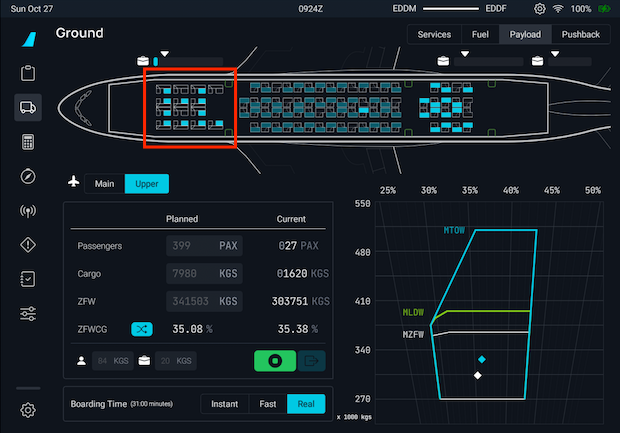
– Overall aircraft weight distribution across various components, such as cargo and passenger placements.
– This data provides insight into whether your aircraft is within operational limits for safe handling.
Modifying Fuel Levels and Weight Balance
In Free Flight Mode:
1. Access the EFB: Open the EFB as previously described.
2. Select the Mass and Balance Tab: This will take you to the customization options.
3. Adjust Fuel Levels:
– Locate the fuel section within the Mass and Balance tab.
– Use the Quick Fill Slider to adjust fuel levels quickly or enter a specific fuel percentage manually.
– After setting the desired fuel quantity, click Load into aircraft to apply the changes.
In Career Mode:
1. EFB Restrictions: Modifications are more restricted in this mode:
– Direct changes to fuel levels through the EFB are not permitted—the Load into aircraft button is disabled to promote realism.
2. Fuel Adjustment Workaround:
– Due to initial bugs in earlier releases affecting fuel adjustments, these issues have since been resolved and functionality restored.
– To add fuel in Career Mode:
– Go to the Settings menu and search for Add Fuel Quantity.
– Assign a keybind (e.g., Shift+F) for quick access.
– Once you’ve loaded your flight, you can press this key combination to incrementally add fuel (25% of tank capacity per press).
3. Weight Balance Adjustments:
– Similar to Free Flight, the Mass and Balance tab can be used to adjust cargo and passenger weights, ensuring an even distribution that impacts aircraft performance and handling characteristics.
Troubleshooting Tips
– Loading Fuel Issues: If you encounter an error message stating “You cannot load in aircraft during this flight phase,” remember:
– Fuel adjustments should be made before takeoff or shortly after spawning. Avoid attempting changes during cruise flight.
– Advanced Adjustments: Some users opt for tools like the SDK and SimVar editor to make custom adjustments, but approach these with caution as they require a degree of technical knowledge and can disrupt the standard gameplay experience.
Conclusion
Fuel management in Flight Simulator 2025 is structured to offer both ease of use in Free Flight and realistic constraints in Career Mode, enhancing the simulation experience. Utilizing the EFB for monitoring and adjustments, along with managing weigh distributions, is essential for a successful flight operation. By following these guidelines, you’ll be well-equipped to handle fuel levels and weight balance effectively.
Leave a Reply