
To achieve the most realistic flight physics experience in Microsoft Flight Simulator 2025, it’s essential to adjust various flight model settings and dynamics parameters. These adjustments will enhance the feel of flying and better simulate actual aircraft behavior. Below you’ll find recommended settings along with an explanation of their importance for realism in flight physics.
Recommended Settings for Realistic Flight Physics
Flight Model and Dynamics
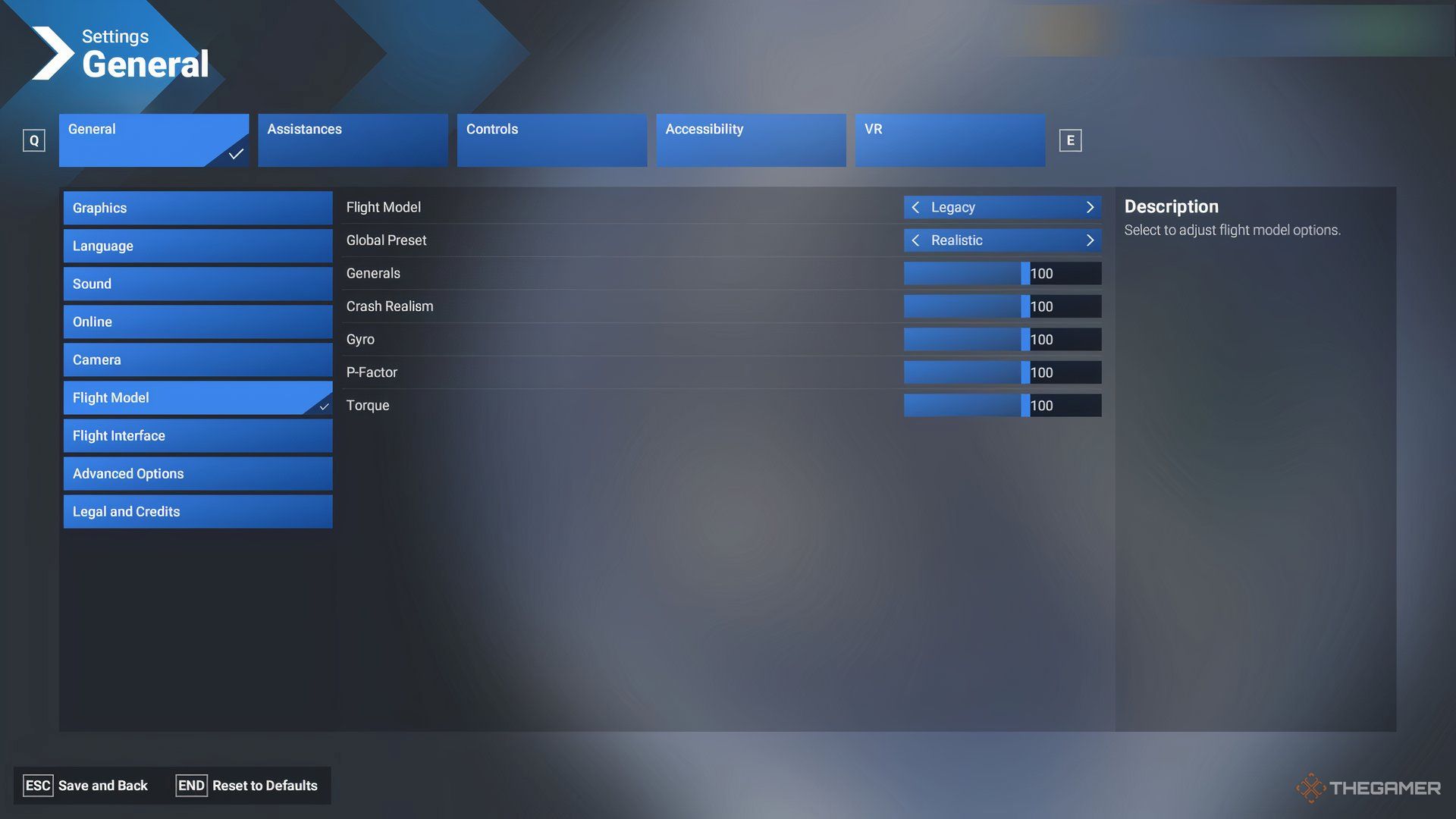
– Flight Model: Modern
– Purpose: This setting provides a realistic and flexible physics model suitable for both default and third-party aircraft, offering an accurate portrayal of flight dynamics.
– Global Preset: Realistic
– Purpose: Selecting this option unlocks the simulator’s true-to-life flight physics, making every flight more authentic.
– Generals: 80
– Purpose: This value finely tunes the flight dynamics’ sensitivity, particularly affecting inertia and drag forces, making aircraft feel more responsive and lifelike.
– Crash Realism: 65
– Purpose: Balances realism in crash physics without punishing small errors too severely, allowing for a more forgiving simulation while maintaining the stakes of flight.
– Gyro: 100
– Purpose: Accurately simulates the effects of gyroscopic forces on aircraft handling, which influences pitch, yaw, and roll stability.
– P-Factor: 100
– Purpose: This setting replicates the torque and asymmetrical thrust produced by propeller-driven aircraft, impacting the aircraft’s handling during take-off and flight.
– Torque: 100
– Purpose: Ensures that the torque effects are fully integrated into the flight physics, adding realism to the way aircraft behave during turns and climbs.
Summary Table of Key Physics Settings
| Setting | Recommended Value | Purpose |
|——————-|——————-|———————————————|
| Flight Model | Modern | Full realistic flight physics and add-on support |
| Global Preset | Realistic | Enables realistic flight behavior |
| Generals | 80 | Controls flight dynamics sensitivity |
| Crash Realism | 65 | Realistic crash impact simulation |
| Gyro | 100 | Gyroscopic effect in aircraft control |
| P-Factor | 100 | Engine torque and propeller realistic effect|
| Torque | 100 | Torque-based flight handling |
Additional Realism Enhancements
– Weather Effects: Although current weather dynamics like turbulence, wind shear, and precipitation effects (e.g., rain or snow) may not be fully modeled, improving these features could significantly increase realism and is a desired enhancement among the flight simulation community.
– Visualization Aids: While tools such as aerodynamic airflow visualizations and HUD elements can help you comprehend flight physics, disabling these aids may enhance immersion and provide a more authentic flying experience.
Final Thoughts
For those looking to optimize their experience further, consider disabling assists such as autopilot or fuel cheats. Emphasis on manual flying will enhance the realism and challenge of your flights, catering to skilled pilots who thrive on the complexities of real-world flying. Balancing these settings effectively will provide a flight simulation experience that closely mirrors real-world physics, appealing to serious sim pilots seeking a high level of realism.

Leave a Reply