
Unlocking and Using Practice Mode in Beat Saber: A Comprehensive Guide
Practice mode in Beat Saber is a fantastic feature designed to help players hone their skills, especially in challenging sections of songs. This guide will walk you through accessing practice mode and utilizing it effectively to enhance your gameplay.
Accessing Practice Mode
1. Select a Song and Difficulty:
– Navigate to the song selection menu and choose your desired track. You can also select the level of difficulty (Easy, Normal, Hard, Expert, or Expert Plus) based on your current skill level.
2. Activate Practice Mode:
– Once you have chosen your song and difficulty, look for the mortarboard icon (often depicted as a graduation hat) near the play button. Click on this icon to initiate the practice mode menu.
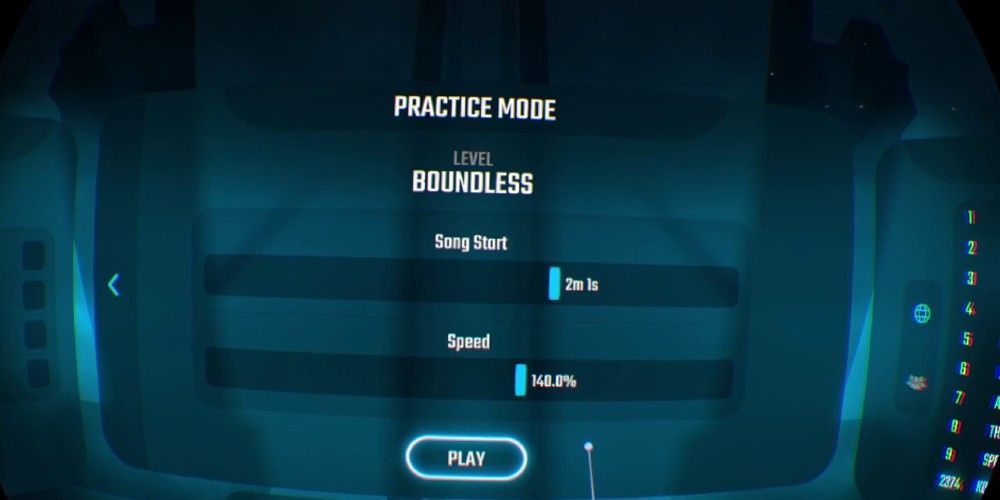
3. Practice Mode Options:
– Timestamp: Utilize the top slider to select a specific section in the song to begin your practice. This is particularly useful for isolating and mastering difficult segments of the track.
– Speed: Adjust the playback speed using the bottom slider. You can slow the song down to as low as 50% of its original speed, allowing you to focus on timing and technique without the pressure of full tempo.
Using Practice Mode Effectively
– Focus on Difficult Sections:
– Take advantage of the timestamp feature to identify and repeatedly practice challenging parts of the song. Slowing down these segments will help you better understand block placements and improve your rhythm.
– Practice with a Purpose:
– Establish specific goals for each practice session. For instance, aim to complete a complicated section without missing any blocks. Once you feel confident, gradually increase the speed to better replicate the actual gameplay scenario.
– Combine with Other Tips:
– Master Basic Techniques: Before diving into more complex sections, ensure you are proficient in the fundamental cutting techniques (e.g., swing direction and timing).
– Track Your Progress: Remember that practice mode scores contribute to your overall playtime statistics, meaning that you can still earn trophies and record progress while honing your skills.
– Experiment with Different Speeds: For songs you’re already comfortable with, try reverting back to faster speeds to sharpen your reflexes, reaction time, and accuracy.
Conclusion
By following the steps outlined above, you can effectively unlock and utilize practice mode in Beat Saber. This feature not only allows you to tackle difficult sections with increased confidence but also emphasizes the importance of targeted practice and gradual improvement. With consistent use and dedication, you’ll see significant advancements in your gameplay ability. Happy practicing!


Leave a Reply