
In Death Stranding, the Odradek scanner serves as a vital tool that enhances the player’s ability to navigate the diverse and often dangerous environments of the game. Understanding its functions and effectively utilizing its capabilities can significantly improve your gameplay experience, especially when dealing with threats from MULEs (hostile human enemies) and BTs (supernatural entities). Here’s a detailed breakdown on how to interpret and use the Odradek scanner effectively:
Function of the Odradek Scanner
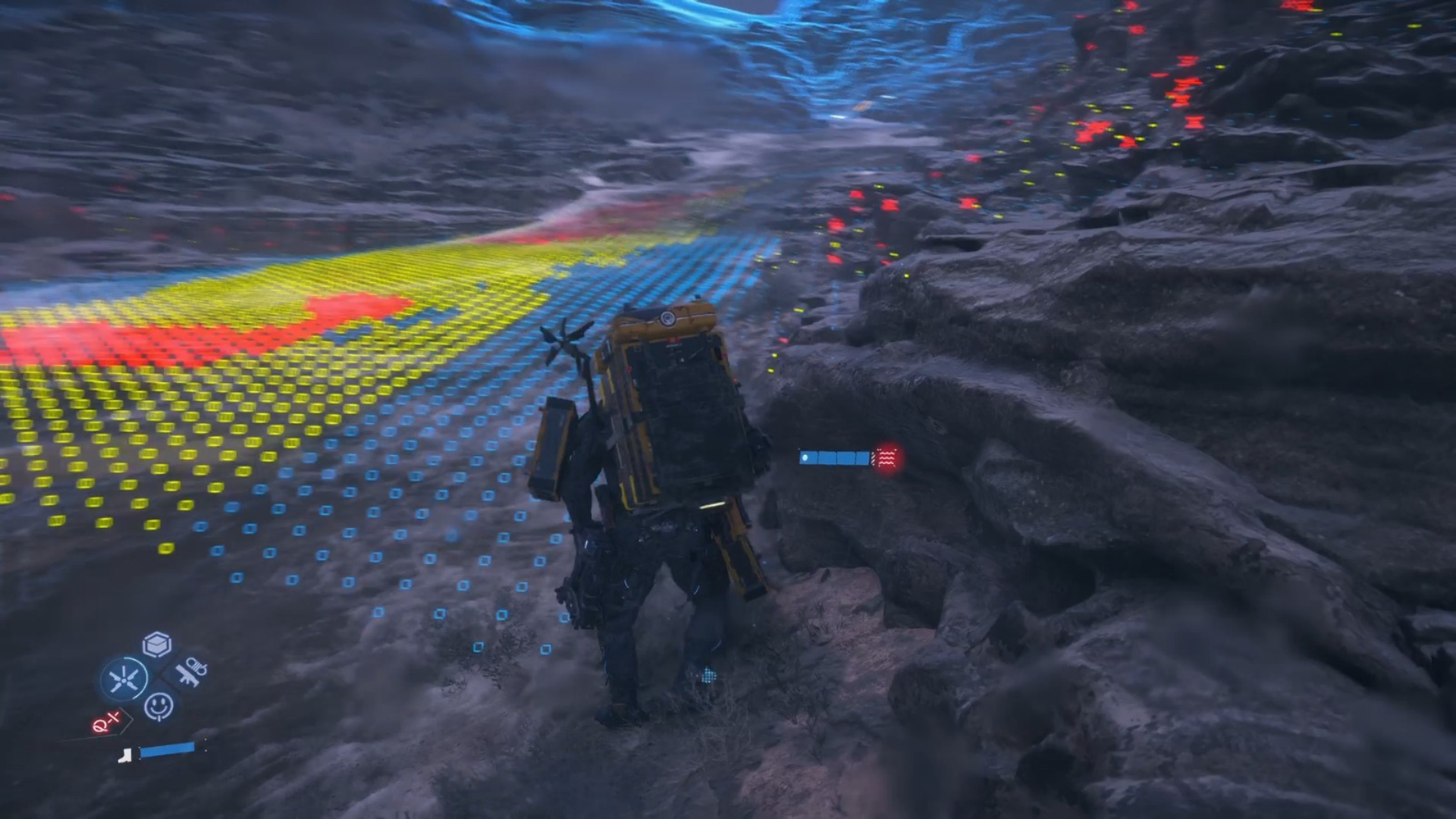
1. Holographic Scan Pulse: When activated—usually by pressing R1—the Odradek emits a pulse that reveals the topography of the surrounding terrain, indicating areas of difficulty, and marking various objects of interest, such as cargo tags and structures. This allows players to gauge the terrain conditions before proceeding.
2. Situational Awareness: The scanner can detect items left by other porters and even highlight cargo from greater distances. This feature not only aids in navigation but also helps players identify potential resources and mission objectives that may be crucial for their journey.
Interpreting the Odradek Scanner to Spot Threats
1. Threat Detection: The Odradek will highlight nearby hostiles, including MULEs and BTs, as holographic indicators. This visual cue is essential for identifying your enemies’ locations before engaging, allowing for a strategic approach to encounters.
2. Enemy Radar Awareness: If enemies detect your presence, their last known position will be depicted as a yellow hologram. This information is crucial for you to understand where enemies think you are, which can guide your next move—whether that’s to evade or confront them.
3. Terrain Difficulty and Enemy Zones: The scanner illustrates the terrain’s difficulty level, essential for strategizing your paths to avoid both hostile encounters and physically challenging areas that may hinder your progress and expose you to danger.
Using the Odradek Scanner Effectively
1. Frequent Activation: It is advisable to activate the Odradek regularly, particularly in areas that appear suspicious or unfamiliar. This allows you to detect hidden threats and neutrally analyze your surroundings, ensuring you’re always prepared for potential dangers.
2. Sensor Range Awareness: Use the scanner to determine enemy sensor ranges. This insight helps you avoid stepping into monitored zones that could trigger an alert, increasing your chances of remaining undetected.
3. Upgrades and Advanced Tactics: As players progress, the Odradek can be upgraded to gain advanced capabilities, such as the ability to cancel enemy radar pings if timed correctly, allowing for a stealthier approach through hostile environments.
4. Combining Stealth Tactics: Integrate the information from the scanner with stealth strategies. Utilize natural cover, like tall grass, to remain hidden from enemies, and consider using silenced weapons to engage foes without drawing attention to your location.
Conclusion
Overall, the Odradek scanner is an indispensable asset in Death Stranding, enabling players to detect environmental hazards, track enemies, and adapt their tactics accordingly. By leveraging its scanning abilities to reveal threats and monitoring terrain challenges, players can enhance their survival strategies and navigate the complexities of the game world more effectively. Mastering the Odradek will not only improve your gameplay but also deepen your engagement with the game’s rich narrative and atmospheric exploration.


Leave a Reply