
In Dragon Quest Builders 2, navigating the expansive game world is made significantly easier through the use of fast travel points, which are unlocked by interacting with special blue orb monuments. Here’s a comprehensive guide on how to unlock and utilize these fast travel points effectively:
Unlocking Fast Travel Points
To unlock a fast travel point, players need to:
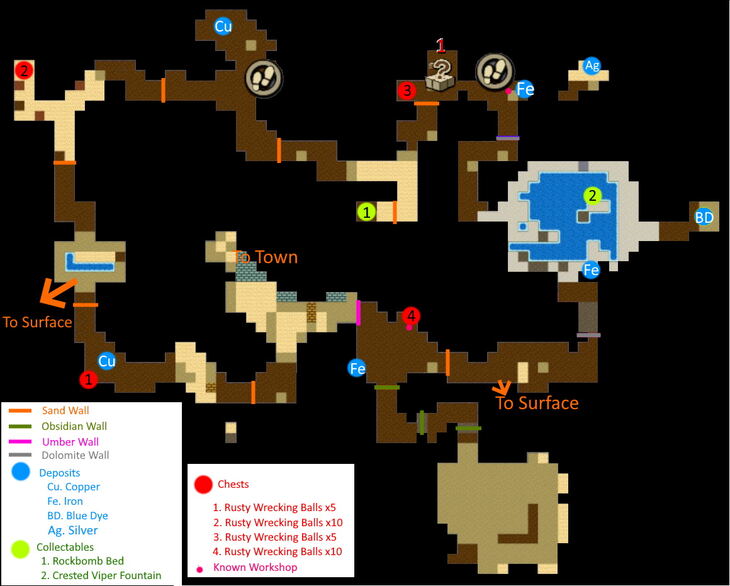
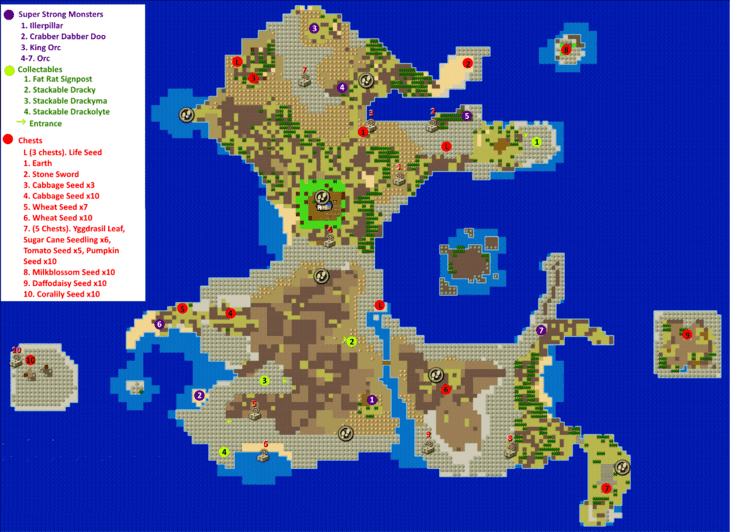
1. Explore the World: As you navigate the Isle of Awakening and various other islands, keep an eye out for blue orb monuments. These can be found in various locations, including both surface areas and more hidden spots, such as upper and lower levels of mines.
2. Interact with the Monuments: Once you locate a blue orb monument, approach it and press the examination button (X on PS4). By doing so, you will activate the monument and it becomes a registered fast travel point.
Using Fast Travel
Once you have unlocked fast travel points, you can easily teleport between them:
1. Open the Map: Press the touchpad button on the PS4 controller to bring up the map.
2. Select Your Destination: Navigate through the map and select the fast travel point you wish to go to.
3. Instant Teleportation: Upon selecting your destination, both you and any companions will be teleported instantly to the chosen location—no additional items or conditions are necessary.
Tips for Effective Exploration
– Thorough exploration is key: As indicated by guides and walkthroughs, numerous fast travel points can exist on a single island, such as the example of having 11 different fast travel points on one island.
– Be thorough: Search through every area, including out-of-the-way places, to maximize your number of unlocked fast travel points.
By consistently searching for these blue orb monuments and registering them as fast travel points, you’ll find that navigating between locations becomes incredibly convenient, enhancing your overall gameplay experience in Dragon Quest Builders 2.



Leave a Reply