
Using Checkpoint Flags in Super Mario Maker 2: A Comprehensive Guide
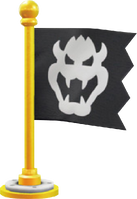
Checkpoint Flags are a vital feature in Super Mario Maker 2, allowing players to save their progress in longer and more challenging levels. Here’s how to effectively use them to enhance the gaming experience.
1. Placing Checkpoint Flags
– Accessing Checkpoint Flags: You can find Checkpoint Flags in the “Gizmos” section of course elements.
– Placement Strategy: Checkpoint Flags can be placed anywhere in your level. Choose locations where you believe players are likely to struggle or after a significant challenge, ensuring they can resume from a safe point rather than starting over from the beginning.
2. Effect of Checkpoint Flags
– Setting Respawn Points: When a player touches a Checkpoint Flag, their respawn point is set to that location. This means that if they die, they will reappear at this checkpoint instead of the start of the level.
– Saving Pink Coins: Upon activating a Checkpoint Flag, any Pink Coins collected by the player up to that point are saved. Players will retain these coins even if they die after reaching the checkpoint.
3. Using Multiple Checkpoints
– Maximum Flags Allowed: You can place up to two Checkpoint Flags within a single level. This is particularly useful for lengthy levels that have multiple challenging sections.
– Respawn Process: Players will respawn at the most recently activated Checkpoint Flag they have touched when they die. Strategically placing these flags can significantly reduce player frustration.
4. Creating Reusable Checkpoints
– Mechanics of Reusable Checkpoints: To create a system of reusable checkpoints, utilize both Checkpoint Flags. By alternating between the two, players can save their progress multiple times throughout the level.
– Example Setup: For instance, if you place two checkpoint flags and have ten Pink Coins available, players can effectively save their progress a total of nine times. This is because activating one checkpoint can refresh the other, allowing them to reactivate it later in the game.
– Limitation Note: A single Checkpoint Flag does not allow for reusable saves; players must trigger the second one to reset the first checkpoint’s status.
5. Additional Tips for Effective Checkpoints
– Enhancing Accessibility: Consider placing a power-up block (such as a Super Mushroom) near checkpoints. This enables smaller Mario to more easily reach the Checkpoint Flag and can aid players who may struggle with the level’s mechanics.
– Strategic Placement: Careful placement of checkpoints, especially in longer or more complex areas of the level, can greatly enhance the player experience. This foresight can mitigate frustration and make the gameplay more enjoyable.
Conclusion
In conclusion, Checkpoint Flags in Super Mario Maker 2 are a crucial tool for level design, allowing players to save their progress effectively. By utilizing one or two checkpoint flags and implementing reusable mechanisms, you can create a more engaging and less frustrating gameplay experience. Remember to strategically position your checkpoints and consider player accessibility for an enhanced gaming journey.


Leave a Reply